
Controls in Warlord: Awaji
Look-to-strike, instant block, radar, sheath pickup, and the formation menu — rebound in Settings, not guessed from a key table.
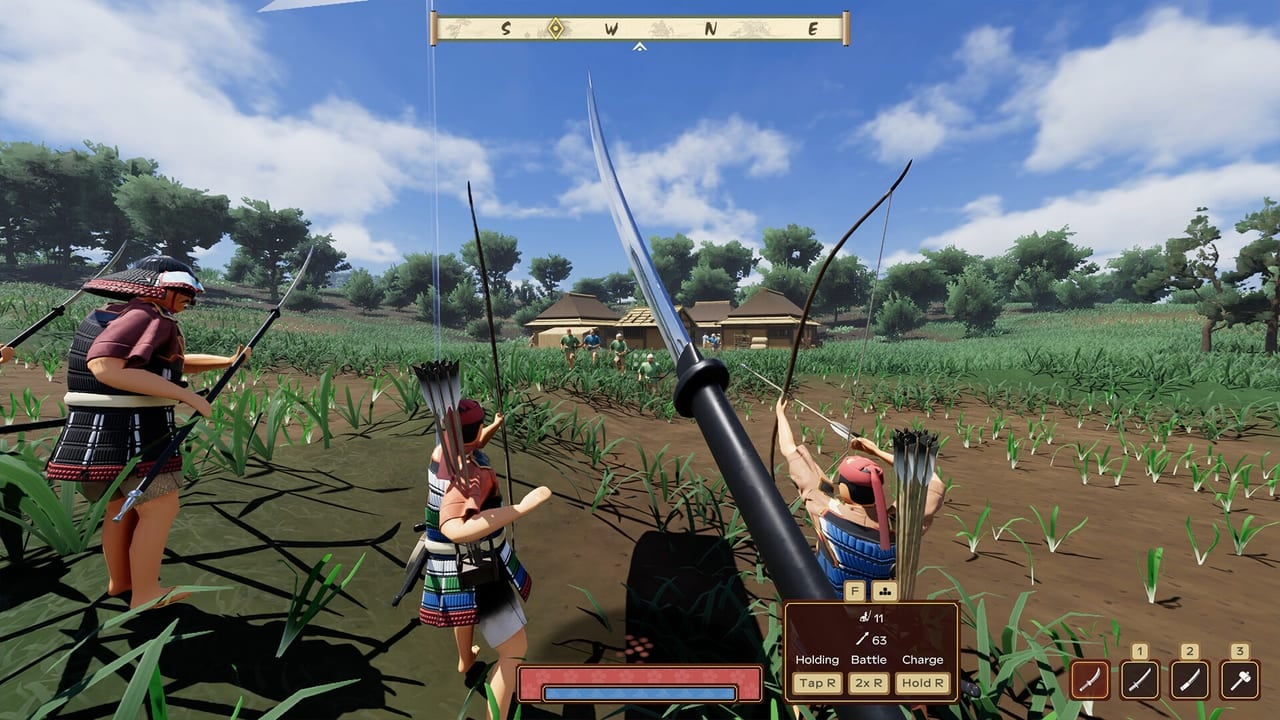
Warlord: Awaji is a first-person immersive strategy game on a real heightmap of Awaji Island. You walk, you swing, and your named retainers live in the same view. There is no overhead RTS camera. The 9 September 2026 Steam release from Darkmatter Games is single-player only. Bindings live in Settings > Controls. This page explains what those actions do, not a guessed key table.
Finish the nearby homestead in getting started with highlights on, then rebind anything that fights your hands. Patch vR101 already froze the pause clock and stripped leftover debug buttons.
Look, move, and read the HUD
You move in first person. Demo videos lean on two combat inputs: the attack button and the block button. The rest of the HUD is for command — radar (allies blue, enemies red), optional character highlights, and a drag-and-drop formation menu.
Look-to-strike: look at the person you want to hit, then press attack. Do not scribble a swing with the mouse. If the strike feels wide, you were looking past the target.
Radar is not a map of the island. Darkmatter added it because period armor does not come with team jerseys. It shows friendlies and enemies within a certain range and inside your field of view. Blue is yours. Red is not. A color-coded dynamic cursor also thickens when you look at an enemy or something you can interact with.
Optional highlights — blue and red silhouettes — shipped in the Next Fest demo with a disable toggle. Turn them on until you can read sashimono and armor color. In the demo, radar and highlights lived under Settings > Game. Launch may rename that pane, so check Settings, then Controls, then any Game or Display page that mentions them.
Attack, block, and the thrust combo
- Look at the target. Press attack.
- Block registers the instant you press it, even if the animation lags.
- Block then attack to thrust. Thrusts are harder to parry than wild slashes.
- Stamina mostly drains when you block, not when you swing.
Aim at unarmored gaps — face, throat, inner arm. Polearms outrange a starting tachi. If a spear is on the ground, sheath your current weapon to pick it up; the developer confirmed that rule. Weapon ranking lives on the weapons tier list. Stamina and weak spots belong on the combat page.
If a spear or naginata vanishes, Next Fest notes gave them a chance to break instead of drop when stamina is empty. Sheath, pick up the next shaft, and stop holding block forever.
Sheath, pickup, and the formation UI
Draw to fight. Sheath to pick up a dropped yari, naginata, or bow. Demo hotfixes even kept a picked-up weapon in-hand on death.
Formation is a drag-and-drop menu, not a control-group RTS. Leaders drive the shape relative to you or to a hold-position anchor. Followers fill gaps when someone dies. Marching mode lets the column snake along your path. Battle mode sends leaders scrambling onto their marks. You can park a personal retinue next to you and detach them for a flank. Camp inventory sits on the right of that interface, with a batch-grab option to kit a whole group. The army page covers promotions. Open the menu, drag a grouping line onto a leader, and walk. If the file blobs, you never left marching mode or never assigned followers.
Pause, demo-era tools, and rebinds
vR101 fixed the pause menu so world time does not crawl while you read. Open pause to rebind, save, or leave the keyboard. Time should hold. If it does not, update through Steam. Saving is now available during play, unlike Warlord: Britannia’s camp-only save. The same patch also renamed the homestead tutorial, raised starting resources slightly, and removed leftover K and J testing-note debug buttons.
Demo-era footage sometimes shows cinematic or time tools. One Instant Action video used 0 to open a cheat-like cinematic panel — time of day, weather, a fly camera. Treat that as demo-era. It may be gone, renamed, or locked behind a different setting at launch. If you want a clock freeze, use the vR101 pause menu, not a remembered demo key.
Rebind in Settings > Controls before you march. If a prompt still mentions a letter that does nothing, you are on a pre-vR101 build or looking at Instant Action footage. Display and PC spec sit on system requirements.
A short drill before you leave camp
- Open Settings > Controls and confirm attack, block, and the formation UI.
- Turn radar on. Confirm blue versus red.
- Leave highlights on. Look, attack, block, then block-attack for a thrust.
- Sheath, pick up a polearm, drag one leader in formation, walk, then switch battle mode once.
After that drill feels boring, go to combat and the guides hub. Bows and horses use the same look-to-strike idea plus ammo switching on bow and cavalry.
Frequently Asked Questions
Quick answers for new warlords landing on Awaji.
Where is the full keybind list for Warlord: Awaji?
In Settings > Controls. This wiki does not publish a guessed key table. Attack and block are the two combat inputs shown in every demo video; the rest is rebound there.
Does the pause menu actually freeze the world?
Yes on patch vR101. Earlier demo builds let time crawl while the Pause label was on screen. Update through Steam if the clock still moves.
How do I pick up a weapon off the ground?
Sheath what you are holding, then pick the dropped weapon up. The developer confirmed that rule. Combat details sit on the combat page.
What does the radar color mean?
Blue marks are allies. Red marks are enemies, within range and in your field of view. Optional highlights add blue/red silhouettes; both can be disabled in Settings.